Intended audience: ALL USERS
AO Easy Answers for Mobile: 1.1
Overview
To deploy the Easy Answers for Mobile App on your mobile/tablet device(s), please check the System Requirements below to ensure compliance with your device(s). The App Store section below provides a link/barcode to enable you to go directly to the App Store entry to install.
System Requirements
Android Version
-
Minimum: Android 10 (API level 29)
-
Recommended: Android 13 (API level 33)+
Display Resolution
-
Minimum: 320 x 568 pts (small Android).
-
Recommended: 375 x 812 pts and above.
Device Services Used
-
Secure Storage (Keystore on Android - for storing authentication tokens).
-
Local Storage (AsyncStorage - for settings, chat history, onboarding state).
Connectivity
-
The app does not work offline. It requires an active internet connection to communicate with the App Orchid server for authentication, Agent conversations, and all core functionality.
Additional Notes
-
Portrait orientation is recommended.
-
Supports both Light and Dark Themes.
Google Play Store
To find the Easy Answers for Mobile App in the Play Store, click here:

…or simply scan this barcode with your mobile device.

Look for the App logo to verify that you have come to the right place.
Configuration Options for AO Platform Server
The Administrator of the AO Platform Server and associated Easy Answers solutions have three configuration options that are specific to the Easy Answers for Mobile App:
Solution Composer
-
Enable Mobile App - ON/OFF Toggle - if enabled, the solution can be accessed from the Easy Answers for Mobile App.
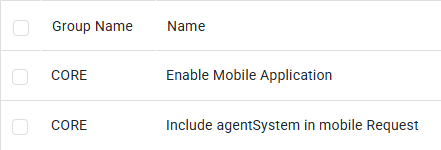
Admin > Configurations > Configuration Properties
-
Enable Mobile Application - system-level configuration. If True, the AO Platform server will support access from the Mobile App.
-
Include agentSystem in mobile Request - system-level configuration to allow support of AO Platform server releases before the 4.5 release.
Contact App Orchid | Disclaimer