
Intended audience: ALL USERS
AO Easy Answers for Mobile: 1.1
Overview
When asking a question, the Easy Answers Agent may not always be able to interpret the request with full confidence. This can happen when a question is ambiguous or contains terms the Agent does not recognize. How the Agent acts during question processing is determined by Interpretation Modes.
Interpretation Modes
When the AO Platform processes a question, it can use one of three different Interpretation Modes. These modes determine the levels of certainty/accuracy the answers will have based on how the generative AI Large Language Model is being instructed to do certain operations:
-
Controlled - enforces strict validation against the enterprise semantic layer, ensuring responses align precisely with defined data structures. Unknown or ambiguous words or phrases are shown to the user. Questions will fail if they cannot be validated, and the user will have to rephrase the question.
-
Balanced - provides guided flexibility, prompting clarification when needed, while maintaining alignment to enterprise definitions. Users will be asked to clarify unknown or ambiguous words before a response can be generated.
-
Freeform - allows more exploratory reasoning, enabling the LLM to interpret the user's questions with a greater degree of freedom. The LLM interpretation of questions will make assumptions where necessary to auto-resolve unknown or ambiguous words to produce a response; However, the user will also be able to provide additional clarifications where needed, which will further refine the results already provided.
Every Easy Answers solution has a default Interpretation Mode selected at the Ontology level (Balanced), and business users typically cannot change the selected mode. However, power users with granted permissions to change these modes will see options to do so when retrying a question that has been answered (using the initial default mode).
How to Select the LLM Interpretation Mode
The LLM Interpretation Mode determines how the Agent interprets and validates a question before generating a response. The mode controls the level of strictness applied when the Agent encounters ambiguous terms or unrecognized words in a question.
To select the different modes:
-
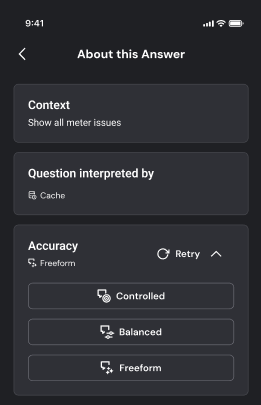
Tap the About icon

-
On the About this Answer screen, tap the Retry dropdown and select a mode.
-
Choose one of the following modes based on your requirement:
-
Controlled: If the Agent detects an ambiguous or unknown term, the question is rejected, and the user is prompted to rephrase or clarify. No assumptions are made.
-
Balanced: If the Agent detects an ambiguous or unknown term, the user is prompted to clarify before a response is generated.
-
Freeform: When ambiguous or unknown terms are detected, the Agent makes assumptions to auto-resolve them and returns a response. The user can also provide additional clarifications to further refine the response.
-
When a Question is Not Understood
The scenarios and options explained below will, in most cases, help the user move forward.
Questions With Ambiguous Word(s)
If a term in your question could match more than one entity in the data, the Agent flags it as ambiguous. The Agent's response depends on the interpretation mode configured for your solution. It either rejects the question or returns a response based on assumptions.
Controlled
-
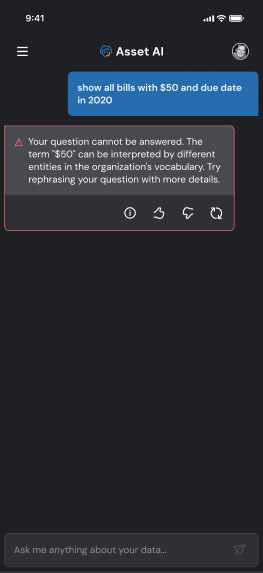
In the example below, the response is rejected because the term "$50" can refer to multiple entities in the data, such as Bills - Original Balance, Bills - Final Balance, or Bills - Balance Forward.
Balanced
-
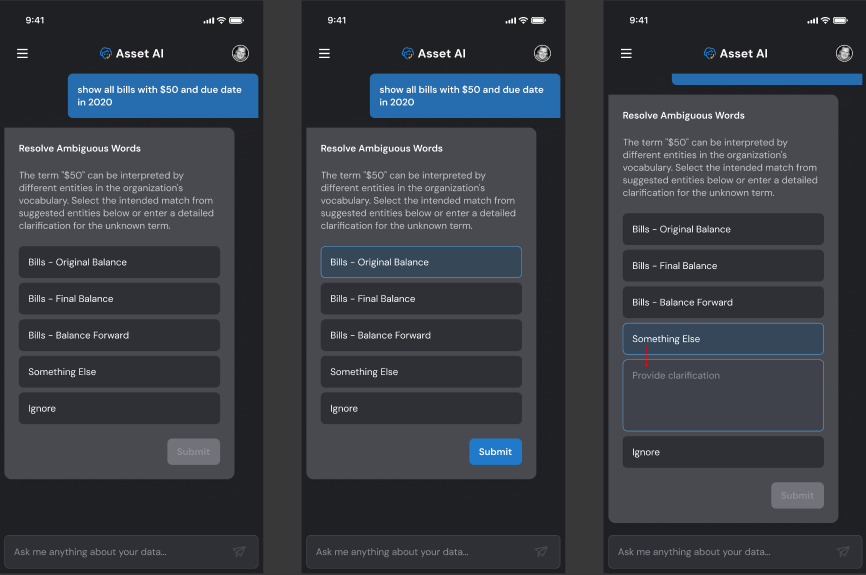
In Balanced mode, the Agent returns a clarification message prompting the user to clarify the ambiguous term. In the example below, the user is presented with multiple options to select the intended meaning of "$50." If none of the provided options match the intended meaning, the user can tap Something Else and enter a custom description of what "$50" refers to in their context.
Freeform
-
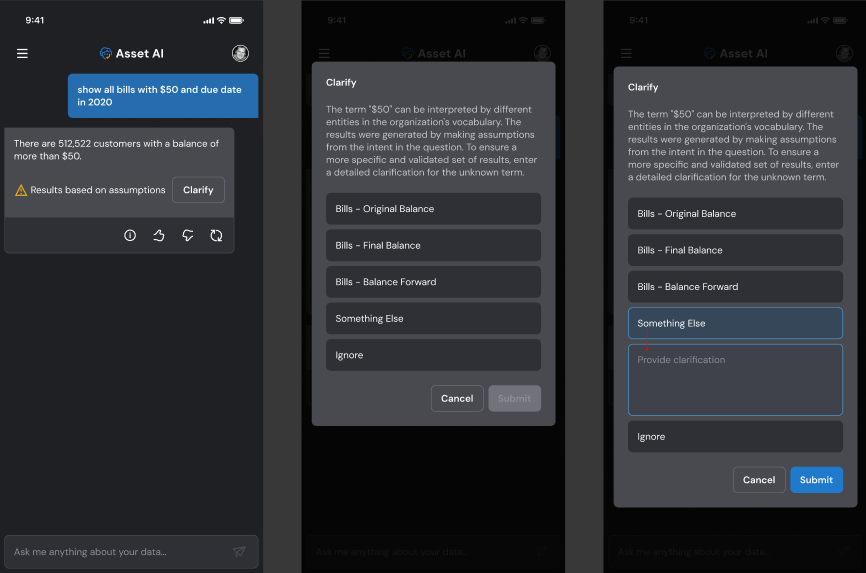
In Freeform mode, the Agent proceeds with its best interpretation and returns a data response, without prompting the user to clarify first. However, a user can tap Clarify and choose the options similar to the Balanced mode described above.
Questions With Unknown Word(s)
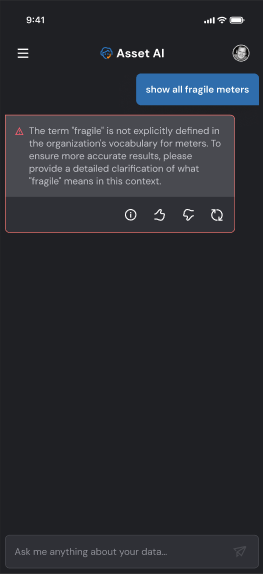
If a question includes one or more terms that are unknown to the ontology, Easy Answers will provide a clarification message to make it clear what is unknown and suggest next steps. Below is an example of the user asking a question using the word “fragile”, which is unknown to the system. Depending on the Interpretation Mode, the system will respond in different ways.
Controlled
-
The user will be presented with a clarification message, but because the interpretation is done in Controlled mode, the user will not be presented with the option to provide a manual clarification text. Instead, the user can either try rephrasing the original question or try any previous questions from History. Only strictly validated questions will be accepted in this mode.
Balanced
-
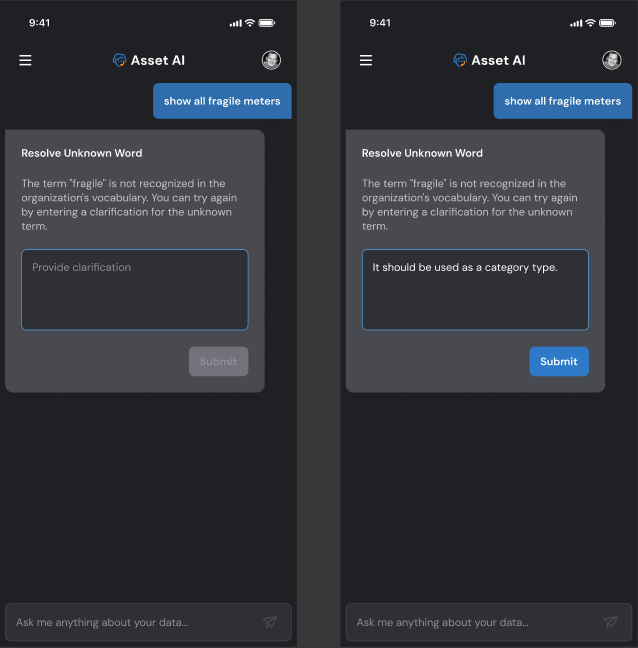
The user will be requested to provide a manual clarification text for the unknown term. If more terms are unknown, the user will continue to be asked to resolve. Once all is done, click Submit to retry the question. No results will be provided until all clarifications are resolved.
Freeform
-
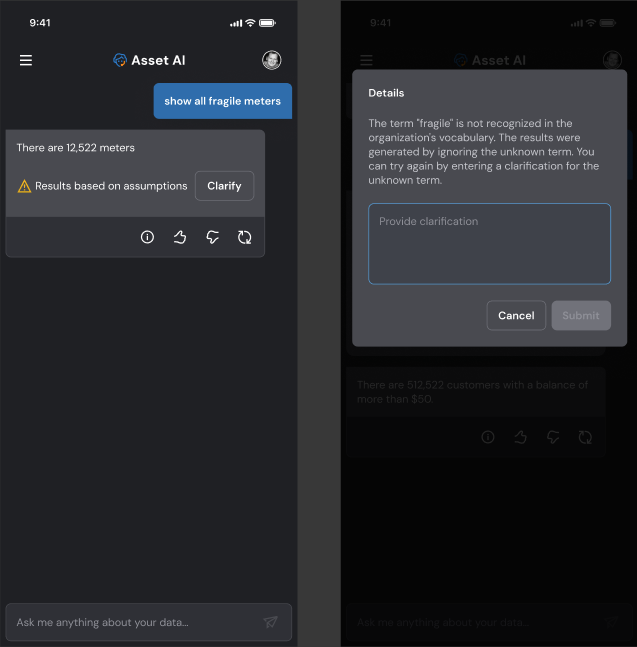
The user will be presented with the same options as in Balanced mode; However, in Freeform mode, the interpretation of the question will also make assumptions about the unknown word and the original intent of the question. This often results in the unknown word being ignored and more data being retrieved. The user can provide clarification to reduce the results to be more specific and validated based on the user’s clarifying input.
Question Has Multiple Ambiguous or Unknown Words
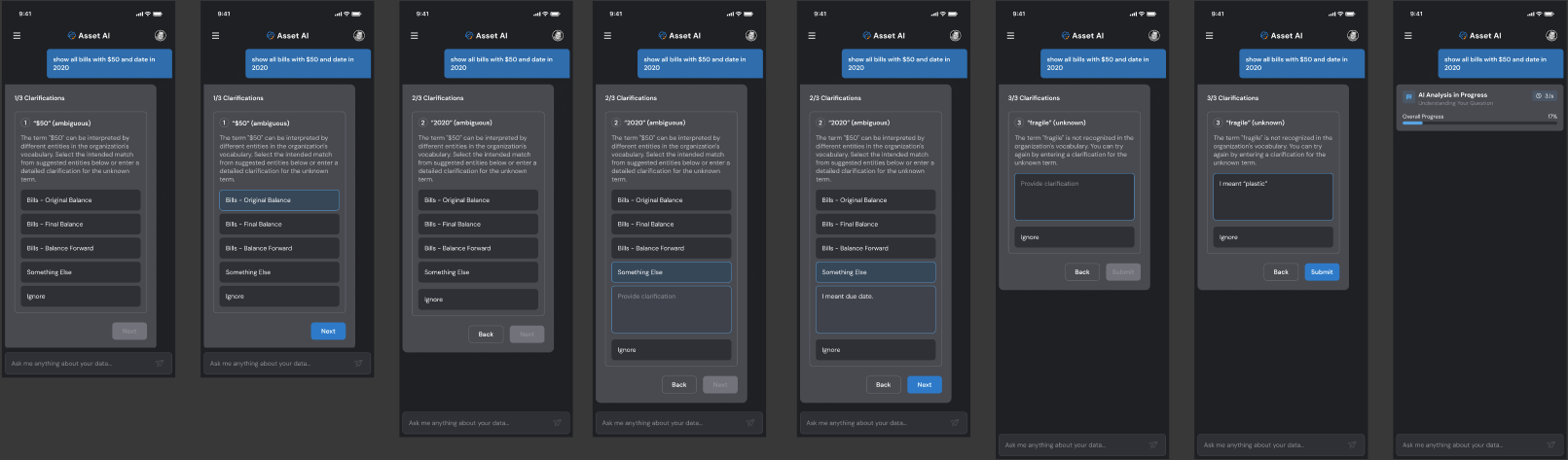
If a question has multiple ambiguous or unknown words, then a clarification message and resolution will be presented for each instance in sequence. In Balanced mode, only when all instances have been resolved and submitted will the processing of the question be completed.
Balanced (example)
Contact App Orchid | Disclaimer